Rail Radar
Live map tracking trains across 7 European countries
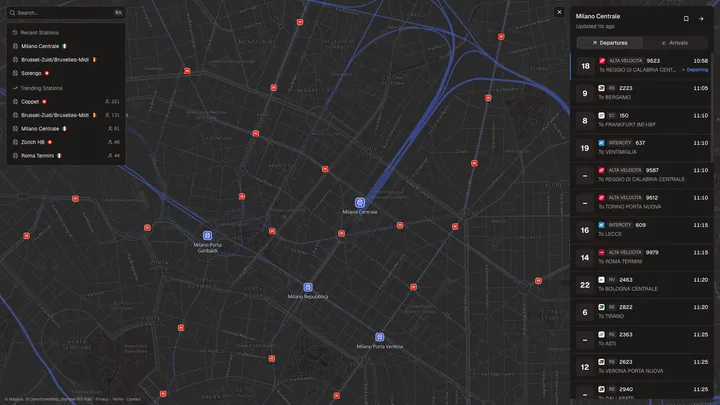
Have you ever wondered where your train is right now, or why it’s delayed? While flight tracking services like Flightradar24 have made it incredibly easy to track planes in real-time, there wasn’t an equivalent solution for trains in Europe. That observation sparked the creation of Rail Radar, an interactive web application that tracks trains in real-time across 7 European countries using official railway data from over 5,700 stations.
What started as an Italy-only project using RFI data has grown into a multi-country platform covering Italy, Switzerland, Finland, Belgium, the Netherlands, Germany, and the United Kingdom, each powered by their respective national railway APIs.
Core Features
Rail Radar is designed to be a comprehensive, real-time railway companion:
- Interactive Map: A dynamic map displaying thousands of railway stations across Europe with real-time train positions and movements, powered by Mapbox GL JS.
- 7 Countries: Live data from RFI (Italy), transport.opendata.ch (Switzerland), Digitraffic (Finland), iRail (Belgium), NS (Netherlands), Deutsche Bahn (Germany), and National Rail (United Kingdom).
- Smart Search: Custom fuzzy matching with Damerau-Levenshtein distance, accent normalization, and geographic search. Type “Milno” and it still finds “Milano Centrale”. Search by coordinates, filter by country or station type.
- Shareable URLs: Every map state, including view, zoom level, and selected station, is encoded in the URL via nuqs. Perfect for sharing travel information.
- Trending Stations: See which stations are most visited right now, today, this week, or this month, with per-country breakdowns.
- Station Analytics: Visit statistics and comparison metrics for every station in the network.
- Geolocation: Quickly find stations near your current location with a single tap.
- Mobile-First Design: Fully responsive interface that works seamlessly on both desktop and mobile devices.
Architecture: A Monorepo Approach
Rail Radar is structured as a monorepo managed with pnpm and Turborepo, allowing shared code and types across multiple applications.
rail-radar/
├── apps/
│   ├── api/           # Cloudflare Workers API (Hono)
│   ├── web/           # Next.js 16 frontend (Mapbox GL)
│   └── studio/        # Next.js admin app (MapLibre GL)
└── packages/
    ├── data/          # Shared station data (GeoJSON) and TypeScript types
    ├── ui/            # Shared React component library (Base UI)
    └── typescript-config/  # Shared TypeScript configs
Why a Monorepo?
- Shared Types: TypeScript types like
StationandTrainare defined once inpackages/dataand shared across the API, web app, and admin studio. No more type mismatches between frontend and backend. - Station Database: Over 5,700 stations stored as GeoJSON features with properties like type (rail, metro, light rail), importance ranking, and country-prefixed IDs (e.g.,
IT1728,CH06013,UKLIVST). - Shared UI Components: The
packages/uilibrary built on Base UI provides consistent components across both the web app and admin studio, with Recharts for data visualization and Sonner for toast notifications. - Atomic Changes: Updating station data or types propagates across all dependent apps in a single commit.
The API Layer: Cloudflare Workers
The backend is a serverless API running on Cloudflare Workers, chosen for its global distribution, generous free tier, and zero server management.
The API does more than just proxy data. It normalizes responses from 7 different railway APIs into a consistent format, handles caching with fine-tuned TTLs (25 seconds for live train data, 24 hours for station GeoJSON), and tracks analytics via Cloudflare’s Analytics Engine.
Built with Hono
The API uses Hono, a lightweight framework optimized for edge environments. It provides Express-like ergonomics with full TypeScript support, middleware for CORS and rate limiting, and seamless Cloudflare Workers integration.
import { Hono } from "hono";
import { cors } from "hono/cors";

const app = new Hono<{ Bindings: Env }>();

app.use("/*", cors());

app.get("/stations", async (c) => {
  const query = c.req.query("q");
  const country = c.req.query("country");
  const stations = await searchStations(query, country, c.env);
  return c.json(stations);
});

app.get("/stations/:id", async (c) => {
  const stationId = c.req.param("id");
  const type = c.req.query("type") || "departures";
  const data = await getStationData(stationId, type, c.env);
  return c.json(data);
});

export default app;
Data Source Integration
Each country required a different integration approach. Italy’s RFI data involved reverse-engineering the ViaggiaTreno API. Switzerland’s transport.opendata.ch provides a clean REST API. Finland’s Digitraffic offers well-documented endpoints. Belgium’s iRail is community-maintained. The Netherlands and Germany required working with NS and Deutsche Bahn’s respective APIs, while the UK uses the National Rail LDBWS (Live Departure Boards Web Service).
The API normalizes all of these into a consistent Train type with scheduled times, actual times, delays, platforms, and route information, so the frontend doesn’t need to know which country’s API it’s dealing with.
The Frontend: Next.js 16 and Mapbox
The web application is built with Next.js 16 and React 19, using Server Components by default and client components only for interactive parts like the map. The React Compiler is enabled for automatic optimization.
For map rendering, Rail Radar uses Mapbox GL JS via react-map-gl. The admin studio uses MapLibre GL JS for its map editing interface.
Performance at Scale
Rendering 5,700+ stations across 7 countries required aggressive optimization:
- Clustering: At lower zoom levels, nearby stations are grouped into clusters. Instead of showing 50 individual markers in Milan, you see one cluster marker.
- Importance-Based Visibility: Stations have an importance ranking (1-4) and type classification. Major stations appear at all zoom levels, while smaller stops only appear when zoomed in, controlled by derived
minzoomvalues in the GeoJSON data. - Viewport Culling: Only stations within the current viewport are processed for interactions.
- Lazy Loading: Detailed station and train information is fetched on-demand via SWR with 30-second auto-refresh.
- URL-Based State: Map position, zoom, and selected station are all encoded in the URL via nuqs, making every view shareable and bookmarkable.
Fuzzy Search
With over 5,700 stations across multiple languages, search needed to be robust. Instead of relying on a library like Fuse.js, I built a custom fuzzy search engine using Damerau-Levenshtein distance for typo tolerance:
- Multi-word matching: Each word in the query is matched independently against station names.
- Match type ranking: Results are ranked by match quality (exact > prefix > word-start > contains > fuzzy).
- Accent normalization: Handles diacritics across Italian, German, Finnish, French, and Dutch station names.
- Geographic search: Enter coordinates like
45.123, 7.456to find nearby stations using haversine distance. - Filters: Combine country codes, station types, and text in a single query.
ch metro zurichfinds Swiss metro stations in Zurich. - Importance weighting: Major stations are boosted in results, so “Milano Centrale” ranks above “Milano Domodossola” when you search for “Milano”.
The Admin Studio
The admin studio (apps/studio) is a separate Next.js application for managing station data. It provides a MapLibre-based interface for editing station properties, verifying coordinates, and managing the GeoJSON database. It integrates with Wikipedia for enriching station metadata and supports the GeoJSON migration workflow.
What’s Next
Rail Radar continues to grow. Some planned improvements:
- More Countries: Expanding to additional European railway networks.
- Train Tracking: Visualizing actual train positions on the map as they move between stations, similar to how Flightradar24 shows planes in motion.
- Route Planning: Helping users find connections between stations, with multi-leg journey support.
- Notifications: Alerts for delays or cancellations on saved routes.
- Historical Data: Analytics on punctuality and delay patterns across countries and routes.
If you have ideas for other features, I’m always open to suggestions on the GitHub repository.
Conclusion
What began as a tool for tracking Italian trains has evolved into a multi-country European railway platform. The expansion from 2,400 Italian stations to over 5,700 stations across 7 countries brought unique challenges: normalizing data from vastly different APIs, building a search engine that works across multiple languages, and keeping the map performant as the dataset more than doubled.
The key architectural decisions that made this growth possible:
- The monorepo structure with shared types and UI components made adding new countries straightforward, each new integration only needs a scraper and station data.
- Cloudflare Workers handled the scaling effortlessly, serving requests from edge locations close to users across all of Europe.
- Country-prefixed station IDs and GeoJSON as the single source of truth kept the data model clean as it grew.
- Next.js 16 with React 19 and the React Compiler delivered the performance needed for a data-heavy, interactive application.
If you’re interested in European rail travel or just want to explore the railway network, visit railradar24.com and start tracking trains. The project is open source on GitHub, where contributions and feedback are always welcome.